
Introduction
Looking to install state-of-the-art technology in your home? One of the best home improvement projects you can do today is the installation of a smart home. It is convenient, energy saving and even increases the value of your property. But when it comes to where to begin, it can be daunting. This tutorial covers all the steps, from planning to setup, and will help you create a smarter home with ease.
What Is Smart Home Installation?
Smart home installation is the process of installing connected devices and systems in your home. These devices communicate via apps, voice assistants or automation routines. This equates to a house that automatically addresses your requirements.
Some popular devices include smart lights, thermostats, video surveillance, locks, speakers, and kitchen appliances. The devices are linked to your home network. They work as a whole, which can be controlled from anywhere.
The world of smart home technology has been booming. Industry reports state that the smart home industry will reach more than $200 billion in the near future. Increasingly, homeowners are putting money into connected technology. Fortunately, installing a smart home is more attainable and affordable these days than even five years ago.
Why Smart Home Installation Is Worth the Investment
However, before we get on to the how, let’s discuss the why. There are a number of benefits to installing a smart home.
Energy Savings Through Smart Home Devices
Smart thermometers, such as Google Nest or Ecobee, get to know your habits. They automatically regulate the temperature to save energy when you’re not at home. Smart plugs turn off devices while they’re “on standby. Smart lights automatically switch off when not in use. The combination of these features can save you a lot of money on your energy bills.
Homeowners say that they are saving about 10-25% on their electricity bills once they install a smart home energy management system. Over time, it will add up. The installation can often be considered a cost-effective investment within one or two years.
Enhanced Home Security with Smart Installation
Another big motivation for people to install smart home technology is security. Smart locks enable remote locking and unlocking of your doors. Guests can be given access without giving them a physical key. Smart doorbells with cameras allow you to view a live video of what is happening at the door, even if you’re gone.
Motion sensors and smart alarms alert you to the outside world right away on your cell phone. You would be notified of things going unusual in real-time. The degree of visibility this provides to homeowners is real peace of mind.
Convenience and Comfort
Installing a smart home simplifies everyday life. The lights can be set to gradually illuminate in the morning. Your coffee maker can brew coffee before you even get out of bed. Voice control systems allow you to turn on entertainment systems, draw blinds or check the weather without even touching a switch.
As you use the device more and more, you will teach the automation what you like or not. The daily activities in your house start to anticipate what you need, instead of waiting for directives.
Planning Your Smart Home Installation
The key to a successful setup is good planning. Impulsive buying may result in the wrong purchases and the loss of money. Here are some guidelines for planning.
Choose a Smart Home Ecosystem
The initial choice you will have to make is which ecosystem you want to create around. The top three platforms are:
- Amazon Alexa — controls thousands of devices and is a great voice assistant.
- Google Home — tightly coupled with Android devices and Google services
- Apple HomeKit — focus is on privacy and it is compatible with iPhones and Macs.
Select the platform that matches the devices that you have. Ecosystems can be blended, but it can lead to conflict. Usually, it is easier to install a smart home within one “ecosystem”.
Assess Your Home Network
All smart home devices depend on a secure Internet connection. Test Wi-Fi range before beginning the installation of the smart home. In some rooms, there may be dead zones that would result in devices losing connection regularly.
If you have a larger home, you may want to consider investing in a mesh Wi-Fi system. Mesh networks evenly distribute coverage throughout each room. This is one of the most neglected aspects of a smart home tech setup, but it’s certainly among the most crucial.
Also, see what the bandwidth of your router is. The more devices you add, the greater the bandwidth you use. Multiple smart devices are much more efficiently managed by a modern router that supports Wi-Fi 6.
Set a Budget for Your Smart Home Setup
There’s no need to spend a ton of cash to install the smart home, but things do add up. Plan a budget in advance. Make a list of the devices that will make the most difference in your life.
The best way to begin is to invest about $200-$500 in a beginner system. This could be a smart speaker, two smart bulbs and some smart plugs. Continuously add more to your system as you get more comfortable with it.
Step-by-Step Smart Home Installation Process
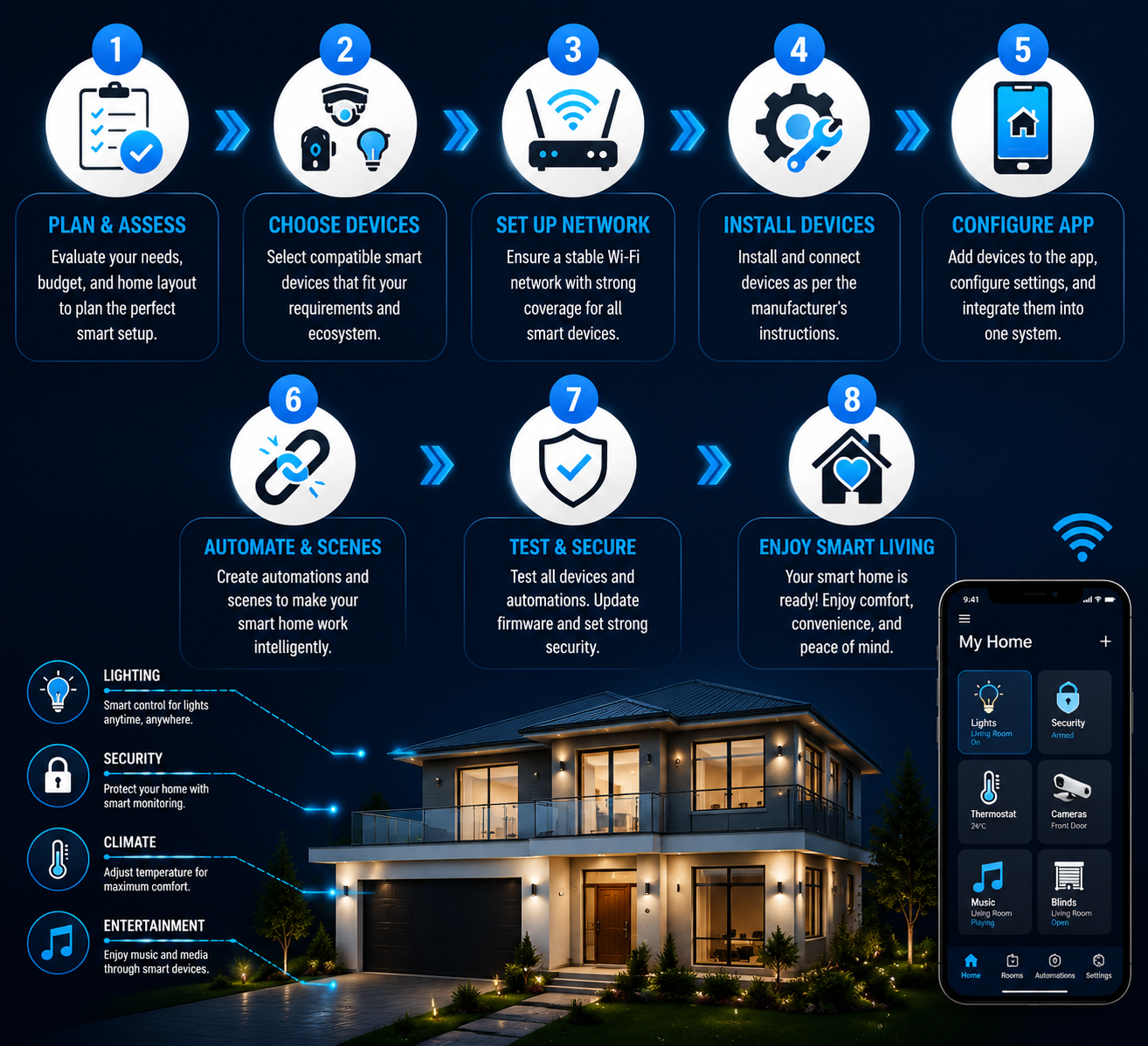
Let’s now put this into practice. In this section, you will learn some of the important steps involved in preparing your connected home.
The first step is to begin with a Smart Speaker or Hub.
The hub is the ‘brain’ of your smart home. It’s the device to hold everything together. Popular options include Amazon Echo, Google Nest Hub and Apple HomePod mini.
Establish your hub as first place. Link it to your Wi-Fi connection and download the connecting app. This will be the hub for all your other smart home devices.
Step 2: Install Smart Lighting
One of the easiest areas to start your smart home is smart lighting. The smart bulbs fit into holes similar to standard light bulbs. They are connected to your app through a bridge or Wi-Fi.
Brands such as Philips hue, LIFX and Wyze provide reliable choices for a variety of prices. After the installation, you can adjust brightness, colours and schedules via a phone app and voice-control.
Step 3: Set Up a Smart Thermostat
One of the greatest value-adds in an intelligent home is a smart thermostat. The installation usually takes around 30 minutes for a person who is comfortable and familiar with performing basic do-it-yourself tasks.
Unplug HVAC unit at the power supply before turning on. Disconnect your old thermostat, take a picture of the wires, and then remove it. Install the new thermostat per the instructions in its mobile app. Many contemporary smart thermostats have step-by-step instructions.
If you’re not at ease working with electrical, have a licensed electrician do this aspect of the smart home.
In Step 4, add the Smart Security Devices.Step 4: Add Smart Security Devices.
The next thing you’ll need to think about is your security configuration. Install a smart doorbell on the front door and place indoor and/or outdoor cameras at entry points. You don’t need to make many changes to install smart locks instead of the old deadbolt.
Ensure that your security devices are connected with your ecosystem. Test individually after installation. Make sure your notifications are reliable.
Step 5: Automate & Customize
With the setup of your devices complete, it’s time to build automations. The benefit of smart home installation is here. Automations enable your devices to interact with each other without any manual effort.
You can, for instance, set a “Good Morning” routine to switch on the lights, set the thermostat, and play your favorite playlist at 7 a.m. A “Leaving Home” routine can be set to lock doors and shut all the lights and activate your security system as soon as you leave.
Take some time to play around with the automation options of your app. The more personalised, the smarter your house can be.
Common Mistakes to Avoid During Smart Home Installation
Top homeowners also make errors when installing smart homes. If you know what to avoid you won’t waste your time and frustration.
When purchasing devices, do so before you check the compatibility.
Not all smart devices are compatible with all platforms. Please check compatibility before ordering. Check the product pages for the “Works with Alexa,” “Works with Google Home” or “Works with Apple HomeKit” badges.
Ignoring Security Best Practices
If you are not careful, smart devices can be a source of hackers. Always change default device passwords. Have robust and different password for home WiFi. Support 2FA on smart home apps.
You may want to create a private smart home network. This helps to ensure that your computers and phones aren’t connected to any devices that might be susceptible.
Overcomplicating the Setup
It’s easy to set up all the automation in one go. But it is better to take steps. Install 1 or 2 devices at a time. Know before you add more what they do! It’s easier to have a good working setup than a complex one that requires constant trouble shooting.
Professional vs. DIY Smart Home Installation
A common dilemma of homeowners is whether to do it all themselves or hire help.
When to DIY
The majority of the smart home devices are easy to install by yourself. Smart bulbs, plugs, speakers and sensors generally do not need any tools. For the most part, people can install a smart home on their own if they feel at ease with using a smartphone app and following instructions step-by-step.
Save money with DIY installation. It also will provide you with more insight into how your system works and make troubleshooting easier in the future.
When to Hire a Professional
There are some things that are easier to do when you hire professionals for the installation of a smart home. Structured wiring, electrical work, built-in speaker installation and whole home automation systems may be the domain of the professionals.
When constructing a new home or upgrading, you might want to talk to a smart home integration specialist. They can plan a system which is completely integrated, cleanly wired and upgradeable.
The average cost of home smart home installation is $500 to $5,000 and can vary considerably based on the number of components in the system. Whole-house systems with the premium can be very expensive.
The Future of Smart Home Installation
Smart home technology is continually advancing. Matter, a new universal connectivity standard, is changing the industry. It makes it possible for devices of various brands to operate on a single network without compatibility problems. It simplifies the installation of smart homes and increases their flexibility.
AI is also being increasingly utilized. Smart home systems are learning by usage and predicting more accurately, with every turn of the wheel.Smart home systems are learning as they go and predicting more accurately with each wheel turn. Future homes will not only listen to commands, they’ll listen to your needs before you ask.
The accuracy of voice recognition is improving. The complexity of energy management systems is increasing. The distinction between house and house with intelligence is still very blurred.
Conclusion
Installing a smart home is no longer just for techies. It’s a hands-on energy-saving, security and convenience improvement. Almost any homeowner can create a connected and seamlessly functioning home with the proper planning and guided by a step-by-step approach.
Begin small, take advantage of the right ecosystem and add one device at a time to your smart home. You can do it yourself or hire a professional, either way, it’s well worth it. Your home will be more efficient today and for years to come, provide greater security and be more enjoyable to live in.