
Introduction
Smart homes are no longer a thing of the future! These are a reality for 10 million homes now. If you have ever wanted to have control over your lights, thermostat and security system from your cell phone, you are not by yourself. With a proper planned home automation installation, a regular home can be turned into a responsive, efficient and secure habitat.
However, how do you begin? The technology, jargon and variety of devices can overwhelm many homeowners. Here’s a guide to all that. You’ll learn all about home automation setup, including the types of devices to choose from and how to hire a professional installer.
This article will help you understand what to expect, how to avoid common pitfalls and what to do at the end of this article. Let’s dive in.
What Is Home Automation Installation?
Home automation installation involves the installation of smart devices and systems that enable you to manage the functions of your home remotely or automatically. This includes such things as light, heat, cooling, security camera, door locks, or even kitchen appliances.
A full home automation system installation is the integration of several smart gadgets. They operate via a centralized platform (or app). That is, your smart thermostat can communicate with your smart lights. You can have an alarm set off by your security camera. No matter what, it is a unified ecosystem.
There is only one objective: convenience, energy saving and peace of mind. Getting to that end-point, however, will depend on careful planning. An unorganized setup is likely to cause frustration, loss of money, and devices that just won’t communicate.
Why Consider Smart Home Automation Installation?
Let’s first answer the obvious question before getting into the nitty-gritty of the technical details. So, why bother investing in smart home automation installation in the first place?
Convenience plays a big role for one thing. Think about reducing the lights, locking the doors, and changing the temperature on your thermostat—with one app on your phone. No more need to go through the house before sleeping at night and checking if all the switches are off.
Second, it is important to consider the efficiency of the energy being used. Smart thermostats can be programmed to run your home heating and cooling based on your schedule. This can save quite a bit of energy costs in the long run. Smart lighting is also useful, as they will automatically power off when no one is in the room.
Thirdly, automation enhances security. Real-time alerts with motion sensors, smart cameras and automated locks. From anywhere in the world, you can monitor your home. This is particularly helpful for those who fly regularly.
Last but not least, its resale value rises. A smart home generally is more likely to sell for a higher price. Today’s customers crave some automation, particularly in urban areas.
Planning Your Home Automation System Installation
All projects start with a plan. Take time to consider your requirements before buying any equipment. This is a crucial step that is sometimes overlooked, but is essential when installing a home automation system.
Assess Your Priorities
First ask yourself what problem do you want to solve? Looking for a more secure experience? Looking to save on energy? Or, are you looking for convenience and comfort? You will determine the devices you opt for first in accordance to your answers.
Choose a Compatible Ecosystem
Smart devices don’t always play together. There are various brands that have Zigbee, some that have Z-Wave and many that have Wi-Fi. Before making a purchase, determine what you will be using Amazon Alexa, Google Home, Apple HomeKit, or something more robust such as SmartThings or Home Assistant.
This is a pivotal decision because, when incompatible ecosystems are mixed up, future headaches will follow. It’s a case of anticipating less pain later with a bit of research.
Set an Achievable Budget
The cost will depend on what you are doing and how much. A few smart bulbs and a smart speaker may only run up to less than $200. The installation of a complete smart home system, with professional labor, security systems and whole-home automation, can cost thousands of dollars. Establish a budget in advance; otherwise, buy unnecessary gadgets.
Steps for Setting Up Home Automation
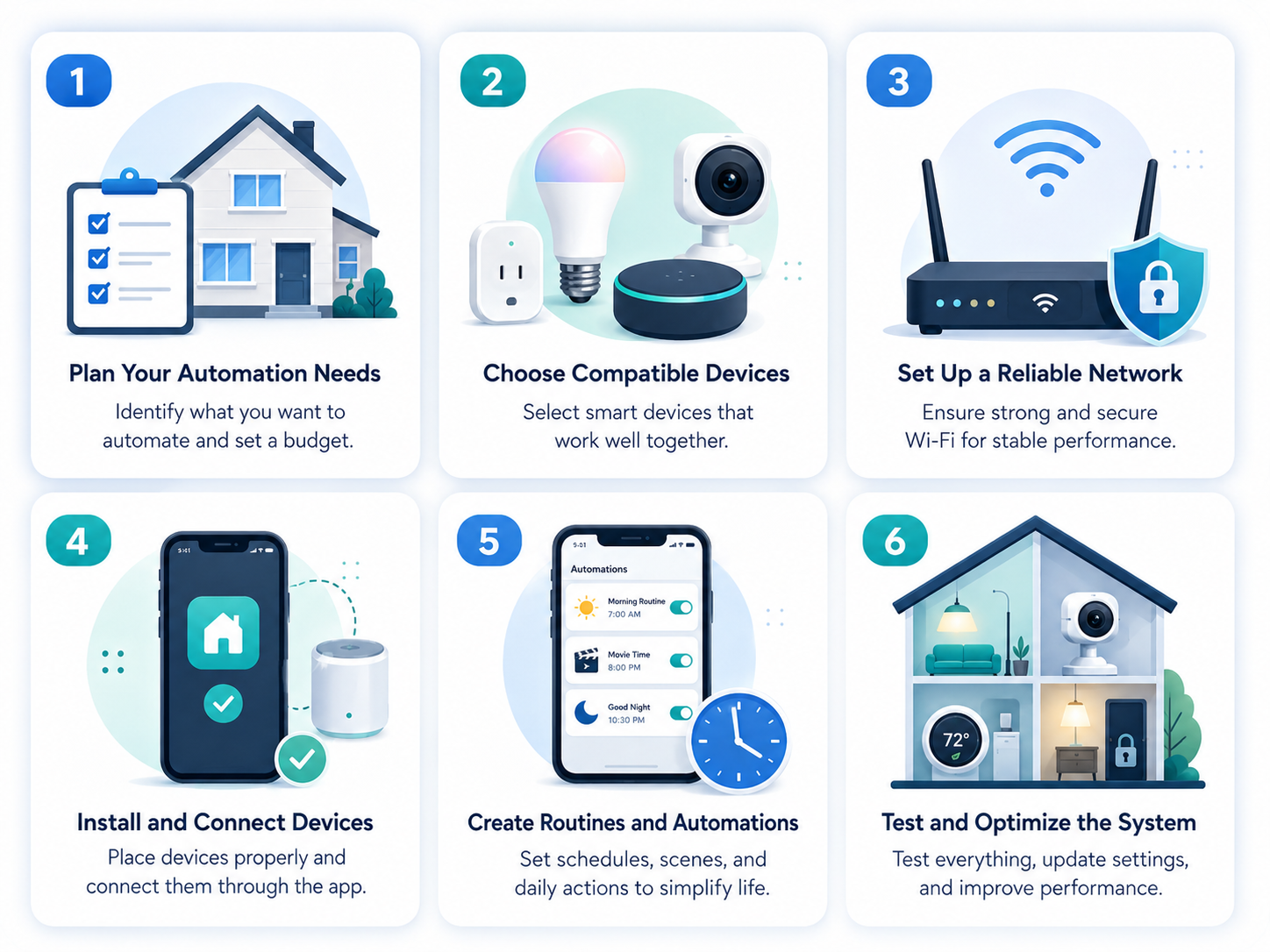
After establishing a plan, now it’s time to go into action. Whether you’re a DIY home automation enthusiast or you’re using professionals, this is a clear-cut blueprint to get home automation up and running in your home.
Step 1: Check Your Wi-Fi Network
The foundation of a smart home is a robust and dependable WiFi network. If there are weak signals, a device may lag, disconnect or fail. Test the internet connection and coverage all over your home before installing anything. If you have dead spots, you may want to install a mesh Wi-Fi system.
Step 2: Begin with a Central hub
A central hub is a must in most home automation systems. This device serves as the brain, which is used to link all your smart devices. The most common devices include Amazon Echo, Google Nest Hub and Samsung SmartThings. Select one that is similar to your earlier selected ecosystem.
Step 3: Install Smart Lighting
The lighting is frequently the most convenient. The installation of smart bulbs is very low on wiring work, they screw into your existing lights. Smart switches, on the other hand, require some electrical work. When not comfortable to wire, this is a good time to seek professional help.
Step 4: Add Smart Thermostats
Access to your HVAC wiring is generally needed for thermostats. Some models have instructions that are easy to assemble, while others may require some special skills, such as older homes with fewer traditional wiring connections. When in doubt, the licensed technician can safely and quickly do this.
Step 5: Set Up Security Devices
Other security features such as cameras, doorbells and smart locks provide an essential safety layer. Positioning matters here. It is important that cameras do not overlap unnecessarily when covering entry points. For door locks to function properly, they must be installed correctly to prevent any security issues.
Step 6: Link Up It All via App
These devices are placed in physical environment, and the last thing that you need to do is to connect them together using the app you selected. This is where automation really is transformative. Routines can be set up to open blinds, set the thermostat and switch on the coffee pot at the same time, for example “Good Morning”.
Step 7: Test and Adjust
Once all devices are hooked up, individually test each one and then as part of a routine. Make changes according to your routine. Automation is supposed to make things easier for you, it’s not you who’s supposed to change to fit automation.
DIY vs. Professional Home Automation Installation
A major decision that homeowners have to make is whether they should do everything on their own or hire a professional. There are pros and cons to both that can help you depending on your level of comfort and the complexity of your project.
The Case for DIY
There are a number of low level smart gadgets that are user-friendly for self-assembling. Smart plugs, bulbs and speakers are typically simple and quick to install, typically taking minutes to do. For simple goals, a DIY project can be an inexpensive and fun weekend project.
However, self assembly has its limits. Expertise is required for complex wiring, whole house audio or advanced security integration. Errors in this section can have expensive or even life-threatening consequences particularly in the case of electrical parts.
The case for the professional installation:
An expert will make sure that the home automation system is installed properly the first time. Experts are familiar with the compatibility of devices, network set up, and wiring needs. They may even be able to fix problems that a typical homeowner could not.
Also, professional installers may offer warranties and support services. This way you’re protected if you experience any issues after setting up.
Hybrid models are also effective for more extensive and complicated projects. Consider installing some lights and plugs, but bring in the professional for the security system and whole-home audio integration.
Common Pitfalls to Avoid When Installing
However, there are some common mistakes that homeowners may be making during a smart home system installation, even with the best intentions. Here are some things to look out for.
Neglecting to plan. You can’t just buy devices without an idea of how to use them, as there will be problems with them being compatible. Do some research before buying.
Ignoring network capacity. If you add too many devices to your network but don’t upgrade your router, your network will get overloaded. This leads to lag time, disconnections and poor automation.
Overlooking security settings. Smart devices are used to connect with the internet, creating an opportunity for hackers to target them. Update passwords at all times, use two-factor authentication, and use updated firmware.
Choosing incompatible brands. If you don’t test the compatibility of the devices you may end up with devices that just don’t communicate. Avoid jumping from one platform to another if possible, or check for cross-compatibility as carefully as possible.
Underestimating installation complexity. There are some devices that seem easy, but need certain electrical expertise. If you are unsure, don’t hesitate to call a professional.
Cost Considerations for Home Automation Installation
The ability to budget correctly will be the key to any home improvement project. The expense of home automation installation varies according to a variety of factors such as the number of devices, complexity of your home wiring and professional installation services.
Simple projects like a few smart bulbs and speaker could be as low as $100-$300. Mid-range systems, such as smart thermostats, locks and a few cameras, typically cost between $500 and $1,500. A fully automated, extensive lighting, security, climate control and entertainment system for a large home can cost more than 5,000 dollars, including installation.
Be aware of any continuing expenses. Cloud subscription fees may apply for cloud storage, monitoring or for advanced features. Include these in your budget for the long-term.
The Future of Smart Home Automation Installation
Technology is progressing at a fast pace and home automation is no exception. AI is making systems smarter, anticipating your actions and modifying settings automatically, without your involvement. Voice assistants are getting more conversational and have the ability to better grasp context than ever before.
To address the compatibility challenges that have been long-felt by smart home consumers, interoperability standards like Matter are designed to address these problems. This new standard enables a seamless and harmonized cooperation between devices of various manufacturers, independent of the ecosystem selected.
Smart home automation installation will most likely be easier, more affordable and more accessible to all as these technologies mature. The days of deep technical knowledge for homeowners to enjoy the advantages of having a connected home are over.
Final Thoughts
Creating a home automation system is no simple task and cannot be accomplished by luck. It takes planning, appropriate devices and sometimes assistance. If you’re going with just a few smart bulbs, or you’re looking to install an entire smart home system, it’s important to do it one step at a time.
The first step is to identify your needs and select an appropriate ecosystem. Then, work on the installation in steps, testing along the way. Avoid attempting to do everything on your own, especially with wiring or setting up security systems.
When you think about setting up home automation, you can truly make it change your life. Your house is made safer, more efficient and more convenient, and it suits your way of life. The technology is available and it is more readily accessible than ever. It’s time to make strides toward a smarter home.